OUR TECHNOLOGY

Luqira Technology

Avatars, voice and live operations.
Connected in one system.

We build the studio, interaction orchestration and scene composition around real live workflows. By connecting avatar, voice and streaming engines, we bring product presentations, audience Q&A and live visuals together.

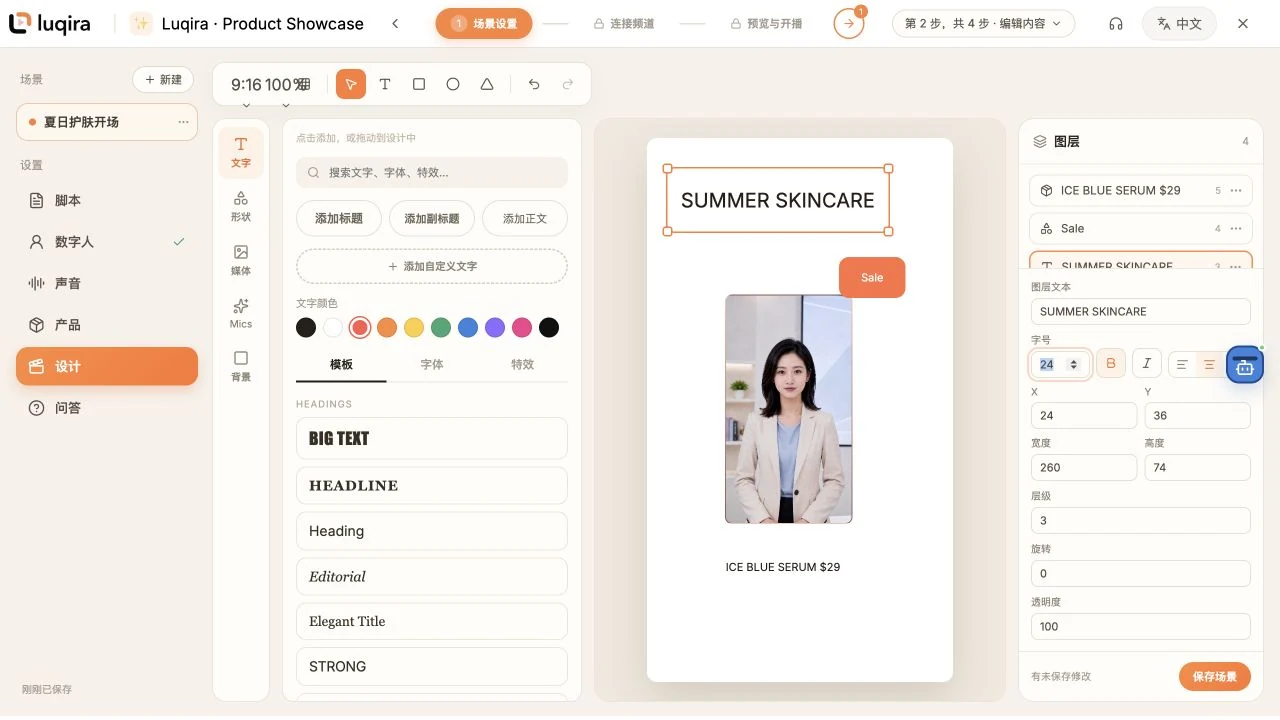
Luqira Studio: edit avatars, product information, text and scene layers on one canvas
LUQIRA STUDIOFrom scene editing to media composition and live output.

SYSTEM CAPABILITIES

Technology built into
each step of your live workflow.

Four connected modules take a project from preparation to live interaction and media output.

01

Products and scripts

Ground each presentation in your product information.

Keep product information, selling points, scripts and frequently asked questions in one project. AI helps draft scripts; your team can edit and save them, and add alternative phrasings for each question.

  • Product information
  • Script management
  • Project Q&A
02

Avatars and voice

Turn text into a voice and an on-screen presenter.

OpenTalking connects the avatar with spoken content and speech synthesis. The voice layer integrates engines such as CosyVoice, selects services by voice and language configuration, and supports previews and voice cloning with authorization.

  • Avatar animation
  • Voice routing
  • Voice previews
03

Live interaction

Start with your answers. Let AI handle the gaps.

Audience messages pass through interaction rules and rate limits, then match custom replies, project Q&A and product FAQs in that order. Unmatched messages go to the configured language model. Replies enter a speech queue so their status can be tracked.

  • Rule filtering
  • Answer matching
  • Reply queue
04

Scenes and streaming

Bring the scene in your studio into the live output.

Our scene compositor combines avatar video, products, text and stickers in layer order. The media gateway receives WebRTC audio and video, encodes them, and sends the output over RTMP to your configured destination.

  • Scene layers
  • Media composition
  • RTMP output

LIVE PROCESSING

How a comment becomes a spoken response.

Each step has a defined role, with traceable reply sources and execution status.

  1. 01

    Audience message

    Receive comments and interaction events from connected channels.

  2. 02

    Rules and answers

    Filter and rate-limit messages, then prioritize saved answers.

  3. 03

    Generate and speak

    Use the language model when needed, then pass the reply to the voice and avatar engines.

  4. 04

    Compose the scene

    Overlay products, text and assets from the current scene.

  5. 05

    Live output

    Encode and stream while recording session and runtime status.

Response time depends on the model, speech length, compute resources and platform network. Rehearse before going live to check the script, voice and visuals.

ENGINEERING

Our own system. Connected to proven engines.

Our engineering brings content, interaction and media services into a live system that can be configured, operated and monitored.

Studio and interaction layerLUQIRA
Luqira implements and coordinates the live studio, product and Q&A management, scene editing, event rules, speech queue and session management.
Model and engine layerOpenTalking · CosyVoice · LLM
Avatars use OpenTalking. Speech integrates CosyVoice and routes to other services according to language and configuration. Scripts and fallback replies use the configured language model. Available capabilities depend on the deployed configuration.
Media transport layerWebRTC · FFmpeg · MediaMTX
WebRTC receives audio and video, and our compositor processes scene layers. PyAV / FFmpeg encoding, MediaMTX routing and RTMP output connect the edited scene to the live destination.
OPERATIONS

Check before going live. Track as you stream.

PREPARATION

Check services and destinations

Check avatar, voice and streaming service status, along with destination configuration. Rehearse before starting the live session.

SESSION MANAGEMENT

Track status and errors

Save session records and track interaction and speech tasks. The media pipeline supports bounded reconnect attempts and releases resources when a session stops.

ASSETS AND ACCOUNTS

Authorization and access control

Voice cloning requires confirmation of authorization from the rights holder. Business APIs check workspace access, and platform credentials are managed on the server.

PLATFORM CONNECTIONS

Connect by platform capability.
Go live when the setup is ready.

Generic RTMP connects to platforms that provide a streaming destination. Comments and interaction require the appropriate platform APIs, account authorization and configuration.

  • Generic RTMP

    Configure the streaming URL and stream key, then send live audio and video through the media gateway.

  • Bilibili

    The project implements live comment collection and session binding to receive interaction messages.

  • YouTube / Twitch

    Authorization and interaction adapters are implemented. Use requires application credentials, account authorization and platform acceptance testing.

  • Douyin / TikTok / Kuaishou and others

    Connections depend on platform capabilities and official or partner authorization. The studio shows which capabilities are available.

Build your live workflow around your products.

Prepare a script, choose an avatar and voice, edit your scene, and preview your first live session.

Open the live studio